
LOCAL SEARCH • PRACTICAL GUIDE
The local SEO checklist for Bakersfield and Santa Clarita businesses
By Viral Digital Marketing · October 1, 2026
Before publishing another post or increasing your ad budget, make sure a nearby customer can find accurate information, understand your services and contact you without friction.
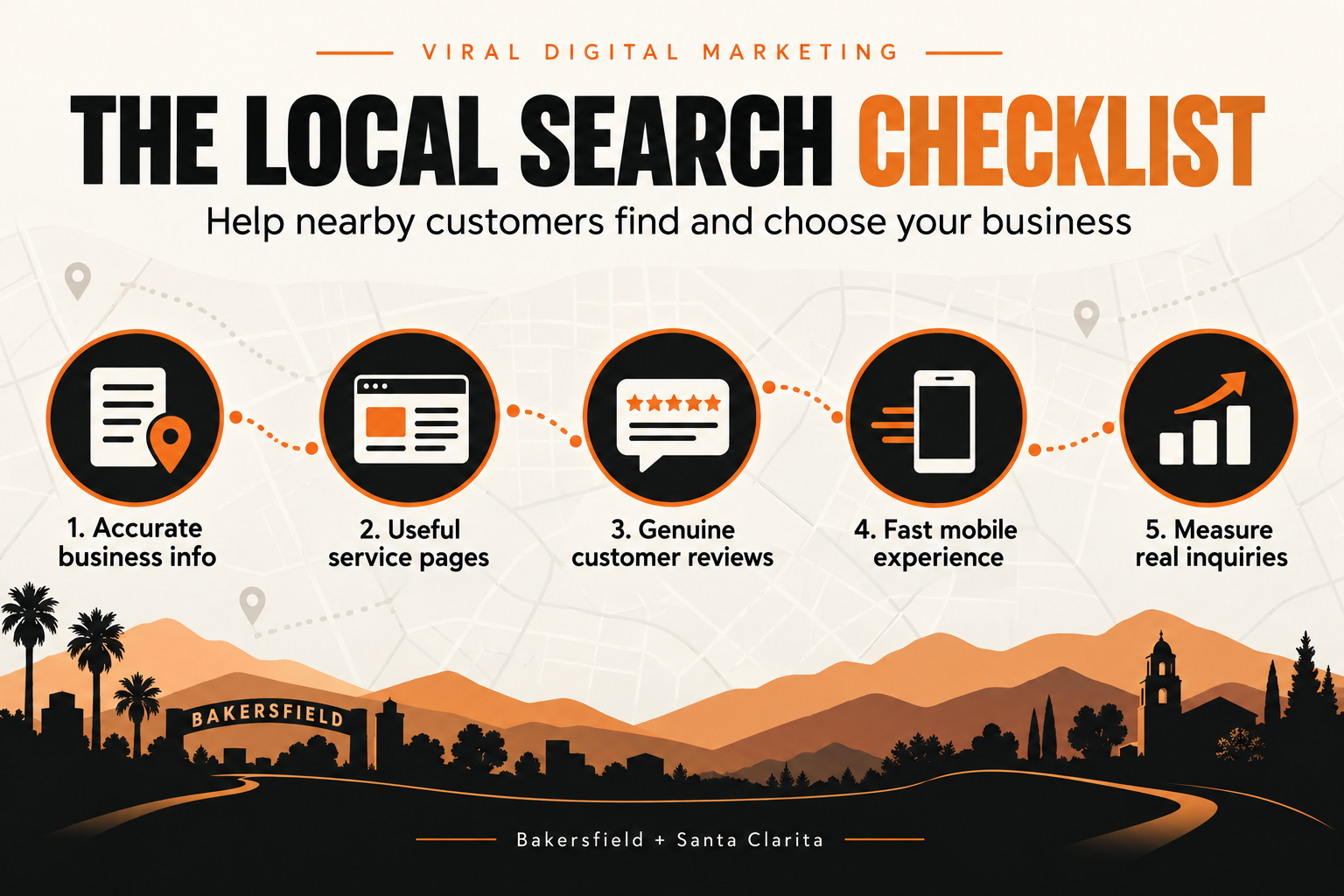
This checklist is for businesses serving Bakersfield, Santa Clarita or both. It is a practical review of the basics you can control. Google explains that local results depend mainly on relevance, distance and prominence, so no checklist can promise a number-one position. The goal is to remove avoidable gaps between a search and a useful inquiry.
1. Make your business information accurate
Compare the business name, phone number, website and hours on your contact page with the information on your Google Business Profile and important directories. Correct outdated details at the source. A customer should not need to decide which phone number is current.
Describe your location honestly. A Bakersfield office and a Santa Clarita service area are different facts. Do not invent an address to target a city, and do not add keywords to a Business Profile name that are not part of the real business name. Check holiday hours when they change.
For a repeatable maintenance process, follow our guide to keeping business hours and contact details accurate, including holiday exceptions and checking the public customer view.
2. Give important services their own useful explanation
A list of services is a starting point. A good service page helps someone decide whether to inquire. Explain who the service is for, what it includes, how the process works and what the customer should do next. Include genuine examples or original photos when you have permission to use them.
For a restaurant, this may mean a current menu and clear dine-in or ordering information. For a home service company, it may mean the types of work handled, actual service coverage and the information needed for an estimate. A medical spa should explain booking steps and avoid unsupported treatment claims.
For a more detailed home service example, use our estimate-page guide to explain the work handled, service coverage, request details and what happens next.
A city page should add useful information about how you serve that area. Copying a page and swapping “Bakersfield” for “Santa Clarita” creates little value. Connect each city page to the relevant services and contact options, and avoid making pages for places you do not serve.
3. Ask for genuine reviews consistently
Make a neutral review request part of your follow-up after real customer experiences. Ask customers for honest feedback, give them a simple way to leave it and respond professionally. Do not offer rewards for positive reviews or request reviews only from people expected to leave high ratings.
Reviews also reveal content opportunities. If customers repeatedly praise a particular part of your process or ask the same question, explain that process on your website using your own words and verified details. Protect customer privacy when sharing stories.
4. Test the whole journey on a phone
Load your homepage, a main service page and the contact page on a phone. Check that text is readable, the menu works, images fit the screen and the primary action is easy to find. Watch for pop-ups that cover the content or buttons that are difficult to tap.
Review large images and unnecessary animations if the page feels slow. Use appropriately sized images and meaningful alternative text. Test forms with an agreed internal test process so the submission reaches the right team without confusing it with a real lead. A visually polished page still needs a reliable next step.
For appointment-based services, use our mobile booking-page checklist to check service selection, time zones, error messages, confirmation and the handoff to your team.
5. Measure inquiries alongside search visibility
When Google Search Console is connected, review impressions, clicks, queries and landing pages over comparable periods. Treat average position as context, not a universal ranking: results vary by query, device, time and searcher location.
Then compare the search story with business outcomes. How many relevant calls or forms arrived? Which services were requested? Did the team respond? If call or form tracking is missing, record that limitation and establish a baseline before claiming an improvement.
For businesses serving both cities, use distinct page and inquiry information where available. Do not assume every visitor to a Santa Clarita page lives in Santa Clarita, or that a change in traffic proves a change in local Maps visibility.
A manageable routine for the next week
- First: correct outdated contact details and broken navigation.
- Next: improve one important service page and link to it from a relevant page.
- Then: publish one original answer to a real customer question and add a useful graphic or example. Use our customer-question content plan to choose distinct topics and give each answer a practical next step.
- At the end of the week: record what changed, what you can measure and what needs attention next.
Daily activity is useful when it improves the customer experience. A publishing quota should not produce repetitive articles, invented local claims or pages written only to repeat a keyword.
Want help applying the checklist?
Viral Digital Marketing is based in Bakersfield and serves businesses nationwide, with Bakersfield and Santa Clarita as priority local markets. Explore our local SEO services, see how we work with Bakersfield businesses and Santa Clarita businesses, or tell us about your website.