
WEBSITE DESIGN • HOME SERVICES
What a home service estimate page should answer
By Viral Digital Marketing · October 10, 2026
Before someone describes a repair or project, help them decide whether your team is the right fit. A useful estimate page answers four questions: the job, the area, the process and the request.
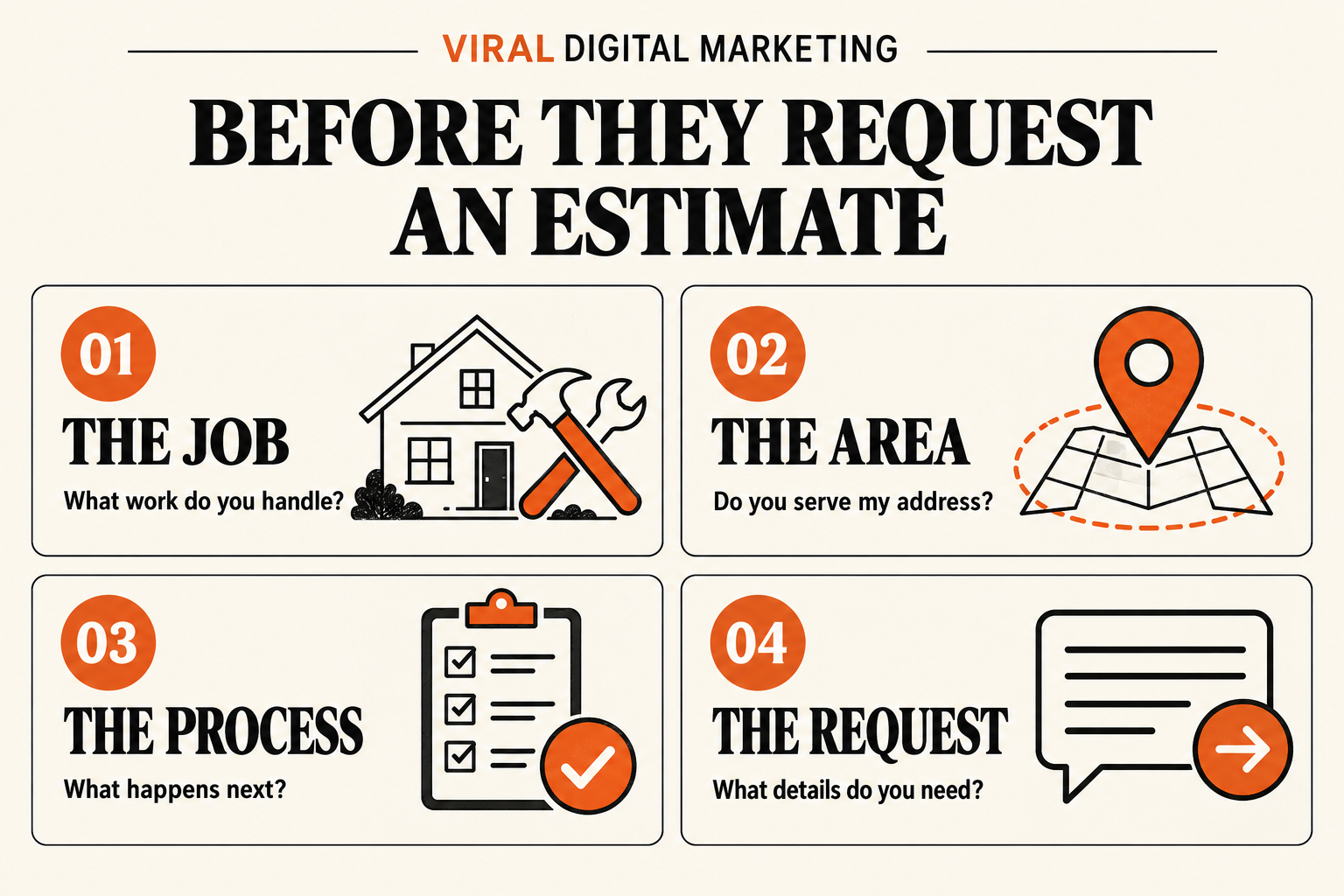
An estimate form can collect a name and number while leaving the customer unsure about almost everything else. Do you handle this type of project? Is their address in your service area? Does submitting the form reserve a visit? The page around the form should answer those questions.
This guide is for home service businesses across the United States. It expands the service-page step in our local SEO checklist into a practical page outline. The aim is clearer inquiries and a more understandable next step; a page rewrite cannot promise a particular search ranking or number of leads.
1. The job: what work do you handle?
Lead with the service the customer is trying to arrange. “Request a fence repair estimate” tells someone more than “Let’s get started.” Use the language your customers use, then explain the work in a few concrete sentences.
List the types of jobs you accept and the important limits. A repair service may need to distinguish repairs from full replacements, residential from commercial projects, or scheduled work from emergency calls. Publish only the distinctions that match the business’s actual operations.
Original project photos can help when they show relevant work and you have permission to use them. Describe what the photo shows without inventing a customer story. If you mention a license, certification or warranty, verify the details and explain its scope. A generic badge or unsupported “best in town” claim does not answer the customer’s question.
2. The area: do you serve this address?
State the real service area near the request form. Name the relevant cities or describe the coverage boundary clearly, with a way to ask about an address near its edge. If availability depends on the job type or travel distance, explain that condition instead of suggesting every request will be accepted.
A company serving both Bakersfield and Santa Clarita should confirm coverage for each market. Serving an area does not mean having an office there. A genuinely useful city page can explain how that area is served and link to the matching service page; it should not be a duplicate with only the city name changed.
Consider what information is needed at this stage. A ZIP code may be enough for an initial coverage check. If an exact address is necessary to assess access or arrange a visit, label the field clearly and explain its purpose. Do not request information merely because another form includes it.
3. The process: what happens after the request?
Describe the next step in the order a customer will experience it. Does someone review the request and call back? Are photos useful before a visit? Is an on-site assessment needed before the team can prepare an estimate?
Distinguish submitting an inquiry from booking a confirmed appointment. If a calendar offers a requested time that still needs approval, say so before submission and repeat it in the confirmation. The button should match what it does: “Request an estimate” and “Confirm appointment” represent different outcomes.
Explain any assessment or call-out fee before the customer commits, using the business’s verified policy. Do not advertise a free estimate unless that is accurate for the work and location. If price depends on scope, explain which details affect the assessment rather than inventing a starting price.
Set a response expectation only when the team can support it. Include staffed hours and the relevant time zone, or explain when requests are reviewed. Keep those details consistent with the website and profiles using our business hours and contact-details routine.
4. The request: what details do you need?
Choose fields that help the team decide what to do next. A practical starting point might include a contact name, a suitable contact method, the service needed, a coverage detail and a short description. Treat this as a starting point to adapt, not a rule that every business needs the same form.
Follow W3C’s form-instruction guidance: make required and optional fields clear, provide format instructions where needed and associate instructions with their inputs. Use visible labels; placeholder text disappears as a person types and should not replace a label.
If photos are helpful, explain what to photograph and make uploads optional unless they are essential to the process. Ask customers to avoid including people, private documents or unnecessary personal details. State supported file formats and limits accurately.
After submission, confirm that the request was received and explain what happens next. When a field needs correction, give a specific message that helps the person fix it. Agree on an internal test with your team to confirm that submissions reach the right place; seeing a success message alone does not establish delivery.
A page outline you can adapt
The following is an illustrative structure, not a claim about any company’s prices, response times or availability. Fill it with verified business details:
- Service and coverage: a descriptive heading, the work handled and the actual area served.
- Fit and limits: who the service is for, relevant exclusions and useful original examples.
- Estimate process: how the request is reviewed, whether a visit is needed and any applicable fees.
- Request form: clear labels, short instructions and fields that serve a purpose.
- Next step: an accurate button, confirmation and supported response expectation.
Keep the essential answers visible as text on the page, even if you also use an infographic or video. Google’s people-first content guidance emphasizes useful, original information that helps readers accomplish their goal. It does not prescribe a preferred word count.
Check the whole path before sending traffic
Open the page on a phone and with a keyboard. Can you read the coverage information, identify each form field and reach the submit button without a layout obstruction? Check the error and confirmation states as well as the empty form.
Link to the page from the relevant service or location page using descriptive words. Google’s link guidance recommends crawlable links and meaningful anchor text. A link such as “request a fence repair estimate” gives more context than “click here.”
After launch, review the questions the team still receives and whether inquiries match the service and area. Compare equivalent periods when you have reliable data, and record tracking gaps. More form submissions alone do not establish that the page attracted more suitable customers.
Make your next step easier to understand
Choose one service page and answer the four questions before expanding the site. Then connect that page to a request process your team can maintain.
Viral Digital Marketing is based in Bakersfield and serves businesses nationwide. Explore our marketing for home service businesses, website and marketing services and nationwide coverage and priority locations. Tell us about the page you want to improve.
Primary-source guidance checked October 10, 2026. This article provides marketing and usability guidance; examples are illustrative.